
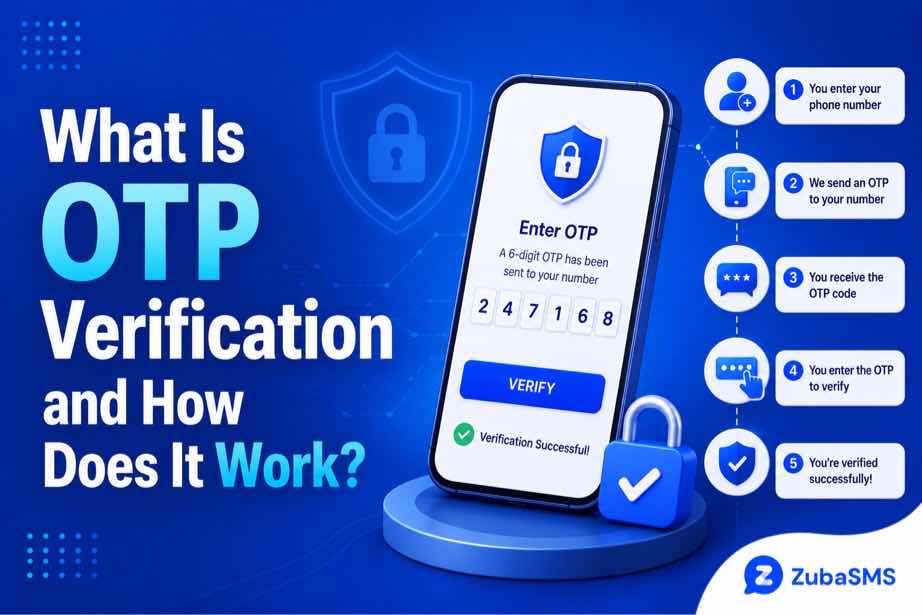
What Is OTP Verification and How Does It Work?
What Is OTP Verification and How Does It Work?
Online security has become an important part of everyday life. People use online accounts for communication, shopping, banking, social media, business, education, and many other activities.
Because passwords can be stolen or compromised, many websites and applications use additional security measures to confirm a user's identity.
One of the most common methods is OTP verification.
OTP stands for One-Time Password. It is a temporary code that can be used to verify a user's identity or authorize a particular action.
Depending on the service, an OTP may be delivered through SMS, email, an authenticator application, or another supported authentication method.
This guide explains what OTP verification means, how it works, where it is used, the different types of OTPs, common problems, and how to use verification codes safely.
Table of Contents
- What Is OTP Verification?
- What Does OTP Stand For?
- How Does OTP Verification Work?
- Why Do Websites Use OTP Verification?
- Types of OTP Verification
- SMS OTP Verification
- Email OTP Verification
- Authenticator App OTPs
- Where OTP Verification Is Used
- Benefits of OTP Verification
- OTP Verification vs Passwords
- Common OTP Verification Problems
- How to Keep OTP Codes Secure
- Virtual Numbers and OTP Verification
- Using ZubaSMS
- Continue Reading
What Is OTP Verification?
OTP verification is a security process that uses a temporary, usually one-time code to confirm that a user has access to an authorized verification method.
For example, when you sign in to an online account, the service may send a six-digit code to your registered phone number.
You then enter that code on the official website or application.
If the code is correct and still valid, the service can complete the verification process.
The key difference between an OTP and a normal password is that an OTP is designed to be temporary.
Once it expires or is successfully used, it generally cannot be used again.
What Does OTP Stand For?
OTP stands for One-Time Password.
The name describes its primary characteristic: the code is intended for a single authentication event or a limited period.
Unlike a normal password, which may remain the same until the user changes it, an OTP is generated specifically for a particular verification request.
For example:
- You request a login verification code.
- The service generates an OTP.
- The code is sent through an approved channel.
- You enter the code.
- The code becomes invalid after successful use or expiration.
How Does OTP Verification Work?
The exact implementation varies between services, but the basic process is similar.
- Verification starts: You begin a login, registration, recovery, or other supported action.
- An OTP is generated: The service creates a temporary verification code.
- The code is delivered: The OTP is sent through SMS, email, an authenticator application, or another supported method.
- You receive the code: The authorized verification channel displays the code.
- You enter the code: You submit the OTP through the official verification page.
- The service validates it: The platform checks whether the code is correct and valid.
- Verification is completed: If the OTP passes validation, the requested action can continue.
Because OTPs are temporary, users should enter them promptly and avoid using old codes after requesting a replacement.
Why Do Websites Use OTP Verification?
Passwords provide an important layer of account security, but they can be exposed in several ways.
A password may be:
- Guessed
- Reused across multiple websites
- Stolen through phishing
- Exposed during a data breach
- Obtained through compromised devices
OTP verification can add another authentication step.
When a service requires both a password and a valid OTP, someone who only knows the password may not be able to complete the authentication process.
OTP verification is therefore commonly used as an additional security measure rather than as a replacement for good password practices.
Types of OTP Verification
There are several ways services can deliver or generate one-time passwords.
SMS OTP Verification
SMS OTP is one of the most familiar forms of verification.
The service sends a temporary code to a phone number associated with the account.
Users can then enter the code into the verification screen.
SMS OTP is popular because it is simple and does not normally require a separate authentication application.
Email OTP Verification
With email OTP verification, the temporary code is sent to the user's registered email address.
This method can be convenient when the user has reliable access to their email account.
Authenticator App OTPs
Some authentication applications generate temporary codes directly on a user's device.
These codes can change regularly and may work without relying on SMS delivery.
Other Authentication Methods
Modern services may also use passkeys, security keys, push notifications, or biometric authentication as alternatives or additional layers of account protection.
Where OTP Verification Is Used
OTP verification is used in many different online situations.
Common examples include:
- Creating a new account
- Logging into an existing account
- Verifying a phone number
- Confirming an email address
- Resetting a password
- Verifying a new device
- Confirming certain transactions
- Changing important account information
The exact requirements depend on the platform.
Benefits of OTP Verification
1. Adds an Extra Security Layer
OTP verification can provide another step beyond a password when a service uses it as an additional authentication factor.
2. Codes Are Temporary
OTPs are generally designed to expire after a limited period or after successful use.
3. Helps Confirm Account Access
An OTP can help a service confirm that a user has access to the registered verification channel.
4. Convenient for Users
SMS and email OTPs can be relatively easy to use because they do not always require specialized hardware.
5. Useful Across Different Services
OTP verification can be used for registration, login, recovery, and other security-sensitive actions.
OTP Verification vs Passwords
| Feature | Password | OTP |
|---|---|---|
| Validity | Usually long-term | Usually temporary |
| Reuse | May be reused | Designed for one-time use |
| Generation | Usually chosen by the user | Usually generated by the service |
| Purpose | Primary authentication | Additional or event-specific verification |
Using both a strong password and an additional authentication method can provide stronger protection than relying on a password alone.
Common OTP Verification Problems
Although OTP verification is usually straightforward, users can sometimes experience problems.
Common issues include:
- The OTP does not arrive.
- The SMS is delayed.
- The code expires.
- The wrong code is entered.
- The phone number is incorrect.
- The email goes to a spam folder.
- Too many verification attempts trigger a temporary restriction.
- The platform does not support the selected verification method.
Most of these problems can be addressed by checking the contact information, waiting briefly, and following the platform's official troubleshooting process.
How to Keep OTP Codes Secure
OTP codes should be treated as sensitive security information.
- Never share an OTP with another person.
- Only enter OTPs on official websites or applications.
- Do not click suspicious verification links.
- Be cautious of unexpected OTP requests.
- Use strong and unique passwords.
- Enable stronger authentication methods when available.
If someone asks you for an OTP, be especially cautious. Legitimate organizations generally should not require you to disclose a private verification code to another person.
Virtual Numbers and OTP Verification
Some platforms allow users to receive SMS verification codes through virtual phone numbers.
A virtual number can provide an alternative phone number for supported communication and verification workflows.
However, not every website accepts virtual numbers.
Before using one, check:
- Whether the platform permits virtual numbers.
- Whether the number supports incoming SMS.
- Whether the number is temporary or longer-term.
- How long you will have access to the number.
- Whether you may need the same number for future recovery.
Using ZubaSMS
ZubaSMS provides virtual phone numbers for supported SMS reception and legitimate communication and verification needs, depending on availability and platform compatibility.
Before choosing a number, consider:
- Country availability
- Incoming SMS support
- Temporary or rental options
- Access duration
- Platform compatibility
Individual websites and applications determine whether they accept virtual numbers for OTP verification.
Explore ZubaSMS virtual numbers
Continue Reading
In Part 2, we will cover common OTP security risks, what to do when an OTP does not arrive, OTP best practices, temporary versus long-term verification numbers, funding options, frequently asked questions, and the conclusion.
Common OTP Security Risks
OTP verification can improve account security, but it is not completely risk-free. Understanding the common risks can help users protect their accounts more effectively.
Phishing Attacks
Phishing is one of the most common risks associated with OTP codes. An attacker may create a fake login page that looks like a legitimate website and attempt to convince a user to enter their OTP.
Always check the website address before entering a verification code and avoid links from suspicious messages.
Social Engineering
An attacker may pretend to be a customer-service representative or another trusted person and ask for an OTP.
Never provide a verification code to another person. Treat the code as private authentication information.
SIM-Swapping Risks
SMS-based OTP verification can be affected by phone-number takeover attacks such as SIM swapping.
For accounts containing highly sensitive information, consider using stronger authentication methods such as passkeys, authenticator applications, or security keys when they are available.
Compromised Devices
If a phone, computer, email account, or authentication device is compromised, verification information may also be at risk.
Keep your devices updated, use appropriate security controls, and protect your primary accounts with strong credentials.
What to Do When an OTP Does Not Arrive
Not receiving an OTP does not always mean that the verification process has failed permanently.
Try these basic troubleshooting steps:
- Confirm that the phone number or email address is correct.
- Check the country code if the OTP is being sent by SMS.
- Check your network connection.
- Look in your email spam or junk folder if using email OTP.
- Wait briefly for a possible delivery delay.
- Request a new code through the official verification page.
- Avoid making many requests in rapid succession.
If the problem continues, the platform may be experiencing a delivery issue or may not support the selected verification method.
Why OTP Codes Expire
OTP codes are intentionally designed to have a limited lifespan.
This reduces the usefulness of a stolen or accidentally exposed code after the verification period has ended.
An OTP may become invalid when:
- The allowed time period expires.
- The code has already been used.
- A newer OTP is generated.
- The verification session is cancelled.
If an OTP expires, use the platform's official option to request another code.
Best Practices for Using OTP Verification
Users can improve their overall account security by following a few simple habits.
- Keep OTPs private: Never share verification codes with other people.
- Use official platforms: Enter codes only on legitimate websites and applications.
- Use strong passwords: OTP verification works best alongside good password security.
- Enable stronger authentication: Use passkeys, security keys, or authenticator applications when appropriate.
- Watch for unexpected codes: An OTP you did not request may indicate an attempted login or verification.
- Keep recovery methods secure: Protect recovery codes and other account-recovery information.
Temporary Numbers and OTP Verification
Some online platforms permit users to receive SMS-based OTPs through virtual or temporary phone numbers.
A temporary number can be useful for supported short-term communication or verification needs, but it may not be appropriate for an important account that requires future access to the same number.
Before choosing a temporary number, consider:
- Whether the platform accepts temporary numbers.
- Whether incoming SMS is supported.
- How long the number will remain accessible.
- Whether you may need the number again later.
For important accounts, long-term access to the registered verification method can be an important consideration.
Virtual Numbers for OTP Verification
Virtual phone numbers can provide an alternative way to receive SMS on services that permit them.
However, a virtual number that can receive SMS is not automatically accepted by every website or application.
Platforms may restrict:
- VoIP numbers
- Temporary numbers
- Shared numbers
- Previously used numbers
- Numbers associated with unusual activity
Always follow the platform's verification requirements and use a number type that it explicitly permits.
OTP Verification for Businesses
Businesses can use OTP verification to help protect customer and employee accounts.
Common applications include:
- Customer registration
- Login authentication
- Password recovery
- New-device verification
- Contact-number confirmation
- Transaction confirmation
A well-designed OTP system can help reduce unauthorized access while keeping verification convenient for legitimate users.
Businesses should also consider appropriate expiration times, attempt limits, monitoring, and alternative authentication methods for sensitive accounts.
Funding Options
| Location | Funding Method |
|---|---|
| Nigeria | Bank Transfer |
| Ghana | Mobile Money |
| Kenya | M-Pesa |
| International | USDT |
Payment methods and availability may change, so check the provider's current funding options before making a purchase.
Frequently Asked Questions
What is OTP verification?
OTP verification is an authentication process that uses a temporary one-time password to confirm a user's access to an authorized verification channel or approve a specific action.
How does OTP verification work?
A service generates a temporary code and sends it through an approved channel such as SMS, email, or an authenticator application. The user enters the code, and the service validates it before completing the requested action.
How long does an OTP remain valid?
The validity period depends on the platform. OTPs are generally designed to expire after a limited period or after successful use.
Why am I not receiving my OTP?
Possible causes include incorrect contact information, network or delivery delays, email filtering, platform restrictions, or too many verification attempts.
Can OTP verification protect an account if a password is stolen?
An additional OTP requirement can make unauthorized access more difficult when an attacker has only obtained the password. However, OTPs do not eliminate all security risks.
Should I share my OTP with customer support?
No. OTPs should be treated as private authentication credentials. Do not disclose them to people who contact you unexpectedly.
Can I use a virtual number for OTP verification?
Some platforms permit virtual numbers, while others restrict them. Check the platform's requirements before using a virtual number.
Is SMS OTP secure?
SMS OTP can provide an additional security layer and is widely supported, but it has limitations such as phishing and phone-number takeover risks. Stronger authentication methods may be preferable for highly sensitive accounts.
What happens if I enter the wrong OTP?
The verification attempt may fail, and the platform may allow you to request another code. Some services can temporarily restrict repeated incorrect attempts.
Can an OTP be reused?
OTPs are designed for one-time or short-term use. Once used successfully or expired, a code should not be reused.
Conclusion
OTP verification is a widely used security method that helps online services confirm a user's identity or authorize specific actions.
Its main advantage is the temporary nature of the verification code. Unlike a permanent password, an OTP is normally valid only for a limited period or a specific authentication event.
OTP verification can be used for account registration, login, password recovery, new-device verification, transaction confirmation, and many other online security processes.
However, OTPs should not be considered a complete security solution. Phishing, social engineering, SIM-swapping, and compromised devices can still create risks.
Users should therefore keep OTPs private, verify that they are using official websites and applications, maintain strong passwords, and use stronger authentication methods when available.
Virtual and temporary phone numbers can also be useful for supported verification workflows, but platform compatibility and long-term access should always be considered.
By understanding how OTP verification works and following basic security practices, users can make better decisions about protecting their online accounts and personal information.