
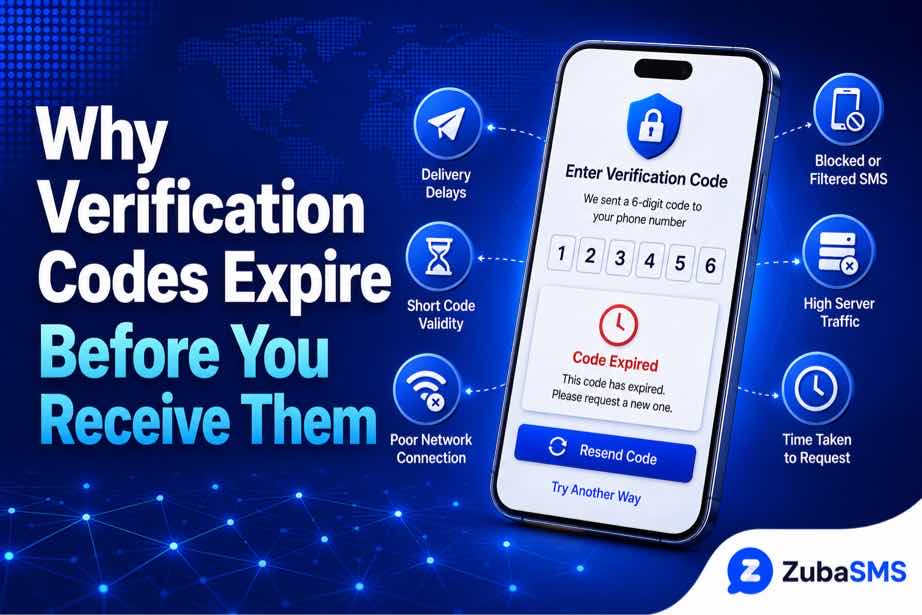
Verification Code Expired? Why Codes Expire Before You Receive Them
Why Verification Codes Expire Before You Receive Them
Few things are more frustrating than waiting for an OTP, only to receive it after the verification page says the code has expired. When a verification code expired message appears before you can even enter the code, the problem may not be your phone or internet connection.
Verification codes are designed to remain valid for a limited period. Delays in SMS delivery, repeated OTP requests, network congestion, and platform-side processing can sometimes cause a code to arrive after its validity period.
In this guide, we'll explain why verification codes expire before you receive them and what you can do to reduce the chances of it happening again.
Table of Contents
- Why Does a Verification Code Expire Before I Receive It?
- How Verification Code Expiration Works
- Common Causes of Delayed OTP Delivery
- How to Fix a Verification Code Expired Error
- Why Temporary Numbers Can Receive Expired Codes
- Common Mistakes That Cause OTP Problems
- Tips to Receive Verification Codes Faster
- Frequently Asked Questions
- Need a Virtual Number for SMS Verification?
- Conclusion
Why Does a Verification Code Expire Before I Receive It?
When a verification code expired message appears before you receive the SMS, it usually means the code's validity period ended while the message was still being delivered.
An OTP passes through several systems before reaching you. The verification platform generates the code, sends it through its messaging infrastructure, and the message is then routed through the relevant SMS networks to the receiving number.
A delay at any point can reduce the amount of time you have to use the code.
Common reasons include:
- SMS network congestion
- Carrier routing delays
- Platform-side processing delays
- Weak mobile network coverage
- Temporary messaging service problems
- Repeated OTP requests
- Short OTP validity periods
- Virtual or temporary number compatibility issues
How Verification Code Expiration Works
Most verification systems generate a code with a specific validity period. For example, a platform may allow an OTP to remain valid for only a few minutes.
The important detail is that the timer can begin when the platform generates the code, rather than when the SMS actually reaches your phone.
For example:
- You request a verification code.
- The platform generates the OTP immediately.
- The SMS enters the messaging network.
- Delivery is delayed for several minutes.
- The OTP reaches you after its validity period has ended.
- The platform rejects the code as expired.
This is why you can sometimes receive a perfectly readable OTP that still doesn't work.
Important: Receiving an OTP does not automatically mean that it is still valid. If the code has passed its expiration period, you'll need to request a new one.
Common Causes of Delayed OTP Delivery
1. Network Congestion
SMS traffic can become busy, particularly when many messages are being sent through the same networks or routes.
When this happens, verification messages may take longer to reach their destination.
2. Carrier Routing Delays
SMS messages may pass through different carrier and messaging systems before reaching the recipient. Problems within these routes can cause unexpected delays.
3. Platform-Side Problems
The website or app you're trying to verify may experience temporary technical problems.
If the platform's messaging service is delayed, your phone may be working normally while the OTP is still taking too long to arrive.
4. Repeated OTP Requests
Requesting several codes in quick succession can create confusion because many platforms invalidate previous codes when a new one is generated.
You might eventually receive an older message, but that code may already be invalid.
5. Short Expiration Period
Some platforms use very short OTP validity periods for security reasons. Even a relatively small delivery delay can therefore cause the code to expire.
6. Temporary Number Limitations
If you're using a temporary phone number, delivery can depend on the provider, carrier routing, and the platform's compatibility with that number.
A temporary number that works well with one service may experience different results with another.
How to Fix a Verification Code Expired Error
If your verification code expired before you could use it, try the following steps.
Request a New Code
The simplest solution is usually to request a fresh OTP using the platform's official resend option.
Once the new code is requested, avoid repeatedly pressing the resend button.
Use the Latest Code
If several verification messages arrive, use the newest code. Older codes may have been invalidated automatically.
Check Your Phone Number
Make sure the phone number and country code are correct. A mistake can send the OTP to the wrong destination or prevent delivery.
Check Your Network
If you're using a regular mobile number, make sure your phone has adequate network coverage and can receive SMS messages normally.
Wait Before Trying Again
If you've requested several OTPs, stop for a while before making another attempt. Some platforms temporarily limit verification requests after repeated attempts.
Try Another Suitable Number
If the same number repeatedly receives codes too late, the issue may be related to the number or its SMS routing.
For services that support virtual numbers, trying another suitable active number can help determine whether the original number is responsible.
Why Temporary Numbers Can Receive Expired Codes
Temporary phone numbers can be useful for receiving SMS verification codes on supported platforms, but delivery isn't guaranteed to be identical across every service.
Several factors can affect the experience:
- The number's current availability
- SMS routing
- Carrier infrastructure
- Platform compatibility
- How quickly the platform sends the OTP
- How long the OTP remains valid
If you're using a temporary number, make sure it remains active while you're completing verification.
If a number consistently receives OTPs after they have expired, selecting another suitable active number may be worth trying.
Verification Code Expired vs. Verification Code Not Received
| Problem | What It Usually Means | What to Try |
|---|---|---|
| Code never arrives | Delivery or number issue | Check the number and SMS support |
| Code arrives late | SMS delivery delay | Request a fresh code |
| Code arrives but is expired | OTP validity period ended | Request a new OTP |
| Code is rejected immediately | Wrong or invalid OTP | Use the newest code |
| Every request fails | Possible platform restriction | Check platform requirements |
Common Mistakes That Cause OTP Problems
Requesting Multiple Codes Too Quickly
Repeated requests can invalidate earlier OTPs and may trigger temporary verification restrictions.
Entering an Old Code
If you requested a new OTP, the previous code may no longer work.
Waiting Too Long After Receiving the Code
Once an OTP arrives, enter it promptly. Waiting until the expiration period ends will cause the platform to reject it.
Using an Expired Temporary Number
If a temporary number is no longer active, you may not receive new verification messages correctly.
Ignoring Platform Restrictions
Some platforms restrict temporary or virtual numbers. In such cases, changing OTP settings won't necessarily solve the problem.
Tips to Receive Verification Codes Faster
- Keep your phone connected to a reliable mobile network.
- Confirm the phone number and country code before requesting an OTP.
- Request only one verification code at a time.
- Wait for the first code before using the resend option.
- Use the newest OTP when multiple messages arrive.
- Enter the code as soon as it arrives.
- Make sure temporary numbers remain active.
- Choose a number that supports incoming SMS.
- Try another suitable number if repeated delays continue.
Tip: If an OTP repeatedly arrives after expiration, the problem may be delivery-related rather than something you're doing wrong.
How ZubaSMS Can Help With SMS Verification
If you need a virtual phone number for receiving verification codes, ZubaSMS provides virtual numbers for SMS verification on supported platforms.
When using any temporary or virtual number, check that it is active, supports incoming SMS, and is suitable for the service you're trying to verify.
If one number repeatedly receives codes too late, trying another suitable number can help determine whether the issue is specific to that number.
Frequently Asked Questions
Why does my verification code expire before I receive it?
A verification code can expire before you receive it because SMS delivery takes longer than the OTP's validity period. Network congestion, carrier routing, platform delays, and other delivery issues can contribute.
What should I do when my verification code expired?
Request a fresh verification code using the platform's official resend option. When the new code arrives, enter it promptly and avoid requesting multiple additional codes.
Why does my OTP arrive late?
OTP delays can be caused by SMS network congestion, carrier routing problems, platform-side delays, or issues with the receiving number.
Does requesting another OTP invalidate the previous one?
Many platforms invalidate earlier codes when a new OTP is generated. Always use the latest code unless the service specifically says otherwise.
Can a temporary phone number receive an expired verification code?
Yes. If SMS delivery is delayed, a temporary number can receive a code after its validity period has ended. The number itself may still be active, but the OTP is no longer valid.
How can I stop verification codes from expiring?
You cannot control the OTP expiration period set by a platform, but you can reduce common delays by using an active number, requesting one code at a time, maintaining good network connectivity, and entering the code promptly.
Can ZubaSMS help me receive verification codes?
ZubaSMS provides virtual phone numbers for receiving SMS verification codes on supported platforms. Availability and platform compatibility can vary.
Need a Virtual Number for SMS Verification?
If you're regularly dealing with a verification code expired message, choosing an active and suitable phone number can make the verification process more convenient on supported platforms.
ZubaSMS provides virtual phone numbers for receiving SMS verification codes on supported services.
Conclusion
A verification code expired message doesn't necessarily mean that your phone is the problem. The OTP may have been generated correctly but delayed somewhere between the verification platform and your receiving number.
Network congestion, carrier routing, platform delays, repeated OTP requests, and temporary number limitations can all contribute to late verification messages.
The best approach is to request one fresh code, wait for it to arrive, and enter the newest OTP promptly. If delays continue, check your number's status and compatibility or try another suitable number.
For supported verification services, ZubaSMS.com provides virtual phone numbers for receiving SMS verification codes.
Part 2: What to Do When Your Verification Code Keeps Expiring
If your verification code expired before you could enter it, the key is to avoid repeatedly requesting new codes without identifying the cause. A few simple checks can help you determine whether the problem is related to SMS delivery, your number, or the platform itself.
Request One Fresh Verification Code
Start by using the platform's official “Resend code” option. Once you request the new OTP, wait for it instead of repeatedly clicking the button.
Requesting several codes can cause earlier OTPs to become invalid, leaving you with multiple messages but only one usable code.
Enter the New Code Immediately
When the new verification SMS arrives, enter the code as soon as possible. OTPs are intentionally short-lived for security reasons.
If the message arrives late, don't keep trying the old code. Request a fresh OTP and use the newest valid message.
Check Whether SMS Delivery Is Delayed
If your verification messages consistently arrive several minutes after they're requested, the issue may be related to SMS delivery rather than the verification page.
Network congestion, carrier routing, and platform messaging systems can all contribute to delays.
What If Every Verification Code Arrives Late?
If this happens repeatedly, compare the behavior across different services.
- Only one platform is affected: The platform may be experiencing an SMS delivery issue.
- Several platforms are affected: Your number or network may be contributing to the delay.
- Only one number is affected: The number may have a routing or compatibility problem.
- Temporary numbers are affected: The platform may have restrictions on that number type.
This comparison can help you avoid changing your phone settings when the actual problem is elsewhere.
Can Changing the Phone Number Fix an Expired OTP?
Changing the number won't make an already expired OTP valid. However, using another suitable number can help if the current number consistently receives verification messages too late.
If you're using a temporary number, make sure it is still active and supports incoming SMS before starting another verification attempt.
A fresh number may also be useful when a particular platform has previously associated the original number with another account.
Temporary Numbers and Expired Verification Codes
Temporary phone numbers can be useful for SMS verification on supported platforms, but delivery times can vary depending on the provider, carrier, and platform.
Before requesting an OTP, check:
- Whether the number is still active.
- Whether it supports incoming SMS.
- Whether the platform supports that type of number.
- Whether enough time remains to complete verification.
If a temporary number repeatedly receives OTPs after they have expired, trying another suitable active number may help identify whether the original number is causing the delay.
How to Avoid Verification Codes Expiring
- Keep the verification page open before requesting the OTP.
- Check your number and country code carefully.
- Request only one code at a time.
- Wait for delayed SMS instead of repeatedly pressing resend.
- Use the latest OTP that arrives.
- Enter the code immediately after receiving it.
- Make sure temporary numbers remain active.
- Use a number that supports SMS from the platform.
- Try another suitable number if repeated delays continue.
Quick Tip: If an OTP repeatedly arrives after expiration, changing the number may help, but first check whether the platform itself is experiencing SMS delivery delays.
When Should You Contact Platform Support?
If verification repeatedly fails even after using a valid number and fresh OTPs, the issue may require assistance from the platform.
Contact support when:
- Every verification attempt fails.
- Multiple suitable numbers are rejected.
- OTP messages consistently arrive after expiration.
- Your account appears to be temporarily restricted.
- The platform displays a specific verification error that you cannot resolve.
Provide the exact error message and explain what happens during the verification process. Avoid sharing the actual OTP with anyone.
Need a Virtual Number for SMS Verification?
If you need a virtual number for receiving verification codes on supported platforms, ZubaSMS provides virtual phone numbers for SMS verification.
Choose an active number that matches your country and verification requirements. If one number consistently receives codes too late, another suitable number may provide a better experience.
Conclusion
When a verification code expired before you could use it, the problem is often related to delivery timing rather than the code itself. SMS network delays, platform-side issues, repeated OTP requests, and temporary number limitations can all contribute.
The best solution is to request one fresh code, wait for it, and enter the newest OTP promptly. If the problem continues, check your number's status and compatibility or try another suitable number.
For supported SMS verification services, ZubaSMS.com provides virtual phone numbers for receiving verification codes.